A new perspective on coding with agents
Give your agents
room to work.
Lascoria is a desktop workspace for Muse Code. See how tasks connect, answer what needs you, and inspect what changed. All without losing the thread.
Built for macOS, Windows and Linux
The workspace, reimagined
Context at a glance.
Depth on demand.
A map for the overview. Floating panels for the details. Your attention stays where it matters.
 Project: Meridian Working
PROJECT MAPA clearer checkout
A closer look
Understand. Steer. Review.
Follow a task from delegation to an approval, then into the code and evidence.
Less chasing. More making.
Complex work doesn’t need
a complicated workspace.
Keep the conversation. Add the perspective.
Lascoria gives parallel work a place, and gives you a calm way back into it.
Built around the way you build
Everything in its place.
Useful detail is always within reach.
It doesn’t have to be always on display.
See the shape of the work
Follow tasks and delegated agents on a constellation map. Zoom, pan and arrange nodes in a way that makes sense to you.
Stay close, without hovering
Questions and approvals gather in one attention queue. Open the transcript when you need the detail.
Inspect the actual change
Read captured diffs and connect verification evidence to the revision it checked. Completion is a starting point for review.
Bring your project together
Start a standalone session or name a project with multiple folder references. Add files and images directly to the composer.
Let sessions collaborate locally
Send an explicit message between Muse sessions on the same machine. Choose what to share and keep the exchange visible.
Choose how you work
Use your Muse subscription or a provider API key. Select a model and reasoning effort, and inspect usage when you want it.
From intention to inspected change
Make a space
Start a session or bring your project folders together.
Set the direction
Give Muse the goal, context and model you want to work with.
Stay in the loop
Follow the map. Answer questions. Keep control of approvals.
Look at the result
Inspect the transcript, diff and evidence before accepting the work.
A deliberate foundation
Native where it counts.
Official where it connects.
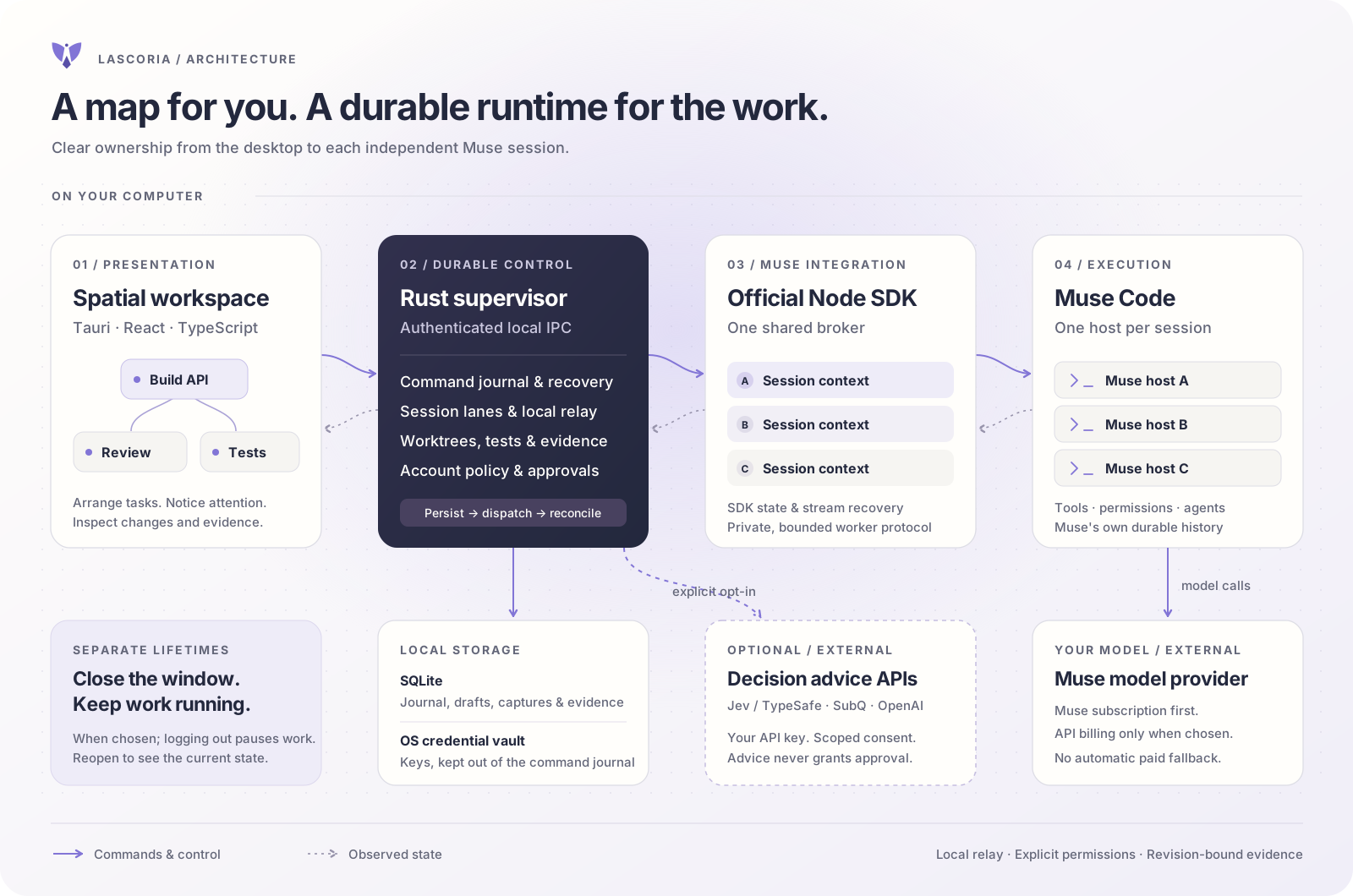
A Rust supervisor owns durable control. The official Node SDK connects to Muse. Tauri and React bring the workspace to life.
Decisions
Opinionated
in your favour.
The product is shaped by a few clear choices.
Your subscription comes first
A browser subscription login takes precedence over an API key. Keep the fallback without accidentally choosing it.
Space for an overview. A transcript for depth.
The constellation reveals relationships. The conversation remains close when you need to understand the detail.
Quiet by default
Collapse panels, focus on the map, and open diagnostics only when they are useful.
Collaboration stays local and explicit
Session messages are relayed on your machine. You choose the destination and context.
Evidence belongs to a revision
A passed check means more when you know which change it verified. Human review and approvals remain part of the workflow.
A few practical questions
Good to know.
Is Lascoria another coding model?
No. Lascoria is a desktop workspace around Muse Code. Muse handles the model interaction; Lascoria organises sessions, tasks, attention and evidence.
Do I need Muse installed?
Yes. Lascoria connects to Muse Code and provides an onboarding flow to help you install it if it is missing.
Will Windows show an installation warning?
The Windows installer is unsigned, so Windows may show an unknown-publisher warning. Some security policies block unsigned apps. Lascoria verifies update downloads separately with its updater signature.
Can I use my Muse subscription?
Yes. Sign in through your browser to use your subscription, or configure an API key. A valid subscription login takes priority.
Does local session messaging connect different machines?
No. The relay connects Muse sessions on the same machine. Sharing is an explicit action.
What about additional decision providers?
Optional bring-your-own-key decision integrations are separate from the Muse conversation. Their results and metrics are available when you want to inspect them.
A little more space
for what comes next.
Bring your code, conversations and decisions into view.
A desktop workspace for macOS, Windows and Linux.